




Zum Inhalt springen
View in the app

A better way to browse. Learn more.

PhantaFriends.de - Deine Community

A full-screen app on your home screen with push notifications, badges and more.

To install this app on iOS and iPadOS
  1. Tap the Share icon in Safari
  2. Scroll the menu and tap Add to Home Screen.
  3. Tap Add in the top-right corner.
To install this app on Android
  1. Tap the 3-dot menu (⋮) in the top-right corner of the browser.
  2. Tap Add to Home screen or Install app.
  3. Confirm by tapping Install.

Bearbeitungshistorie

Bitte beachte, dass Revisionen, die älter als 14 Tage sind, gelöscht werden und hier nicht mehr angezeigt werden.

flaffstar

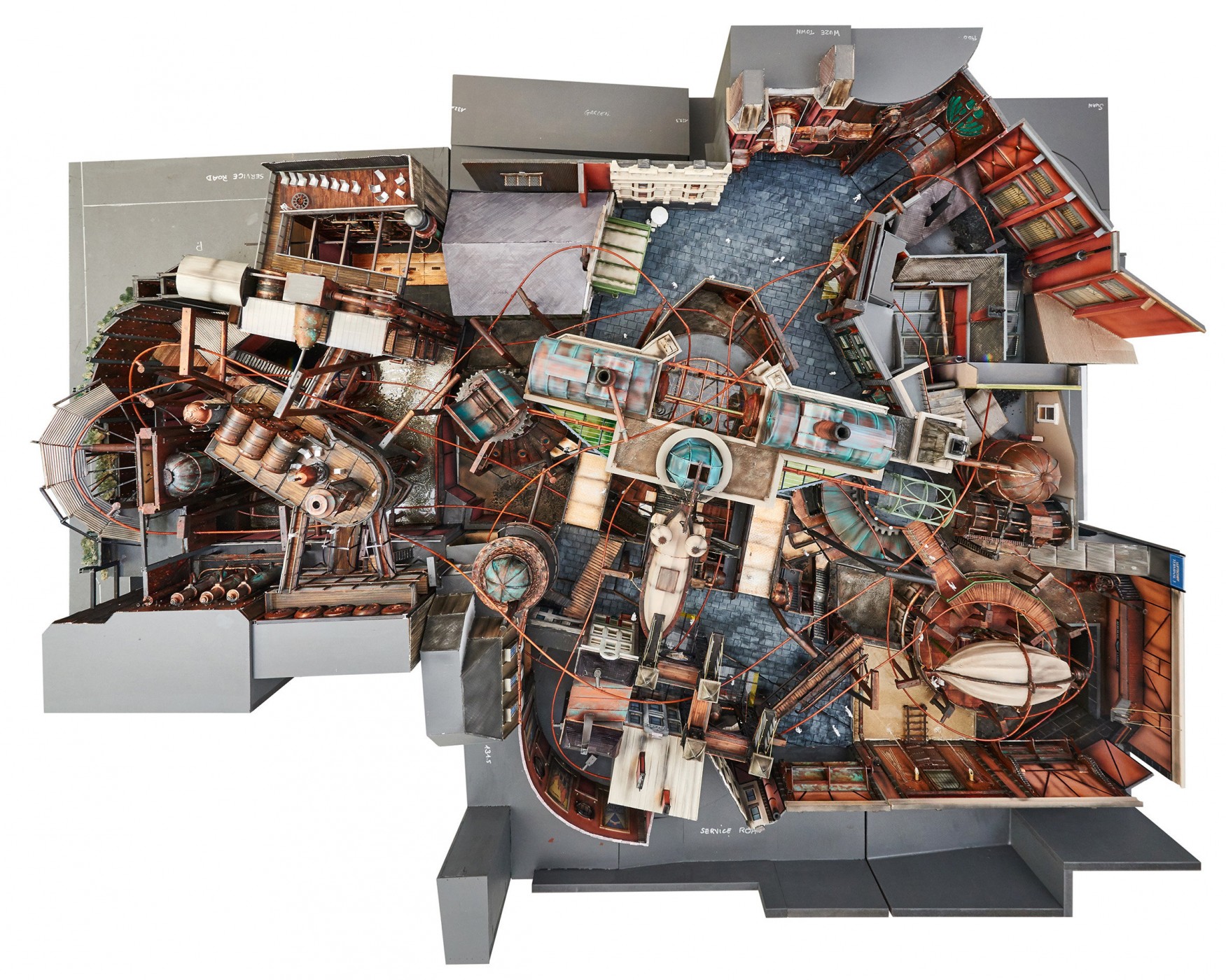
Auch wenn das keine neue Erkenntnis war, dachte ich, ich schau mir mal das ursprüngliche Modell an.

Und auch wenn aus dem Modell doch teile etwas Anderes geworden ist, ist der Grundaufbau ja ziemlich korrekt. Interessanterweise, war an der Stelle wo jetzt "nur" die Dampfdruck-Tür steht, ein viel größerer und imposanter Durchgang geplant. Die angrenzenden Halle wurde mit "Wuze Town" beschriftet. Es kann also wirklich sein, dass hier nun nach langer Zeit der scheinbar sowieso geplante Übergang nach Wuze Town realisiert wird. Nicht mehr, nicht weniger.
top.jpg

Quelle: MTM

Noch mal den Abschnitt den ich im Detail meine:
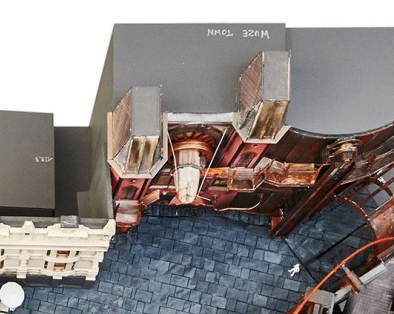
image.pngimage.png

flaffstar

Auch wenn das keine neue Erkenntnis war, dachte ich, ich schau mir mal das ursprüngliche Modell an.

Und auch wenn aus dem Modell doch teile etwas Anderes geworden ist, ist der Grundaufbau ja ziemlich korrekt. Interessanterweise, war an der Stelle wo jetzt "nur" die Dampfdruck-Tür steht, ein viel größerer und imposanter Durchgang geplant. Die angrenzenden Halle wurde mit "Wuze Town" beschriftet. Es kann also wirklich sein, dass hier nun nach langer Zeit der scheinbar sowieso geplante Übergang nach Wuze Town realisiert wird. Nicht mehr, nicht weniger.

top.jpg

Quelle: MTM

Noch mal den Abschnitt den ich im Detail meine:
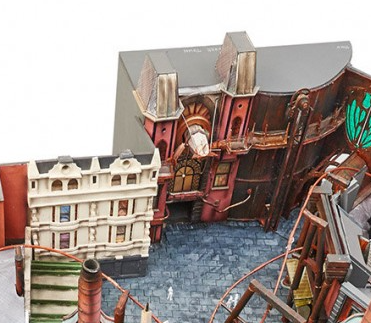
image.png

Configure browser push notifications

Chrome (Android)
  1. Tap the lock icon next to the address bar.
  2. Tap Permissions → Notifications.
  3. Adjust your preference.
Chrome (Desktop)
  1. Click the padlock icon in the address bar.
  2. Select Site settings.
  3. Find Notifications and adjust your preference.