Rhettung
Mitglied
-
Registriert
-
Letzter Besuch
Alle Beiträge von Rhettung
-

-
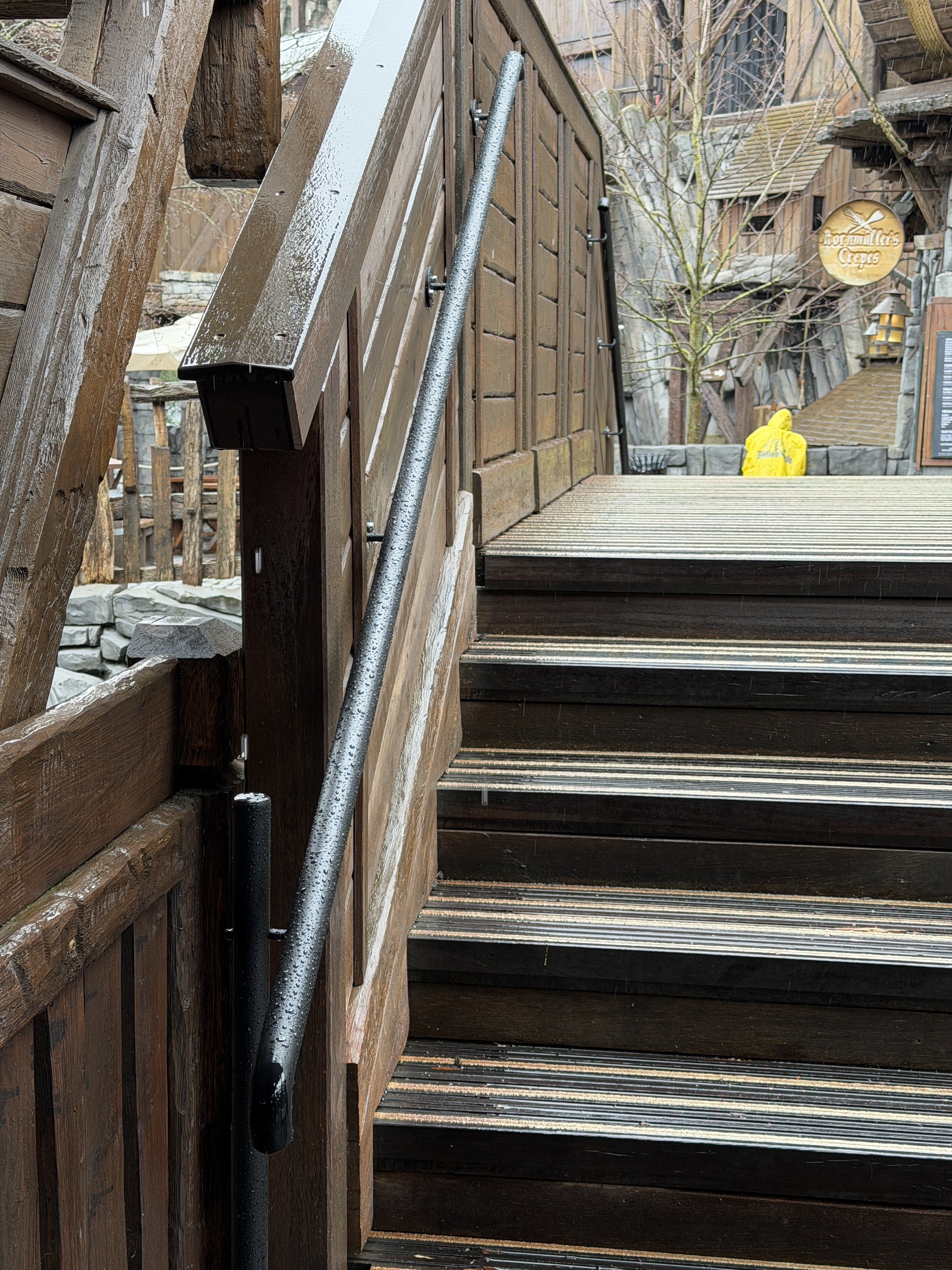
Die Treppen in Klugheim haben nun endlich Geländer bekommen. War meiner Meinung nach auch überfällig da die Treppen bei Hochbetrieb doch schon ihre Tücken haben. Im schönen Schwarz passend zur Schiene :)
-
-
Im Charles Lindbergh gibt es seit diese Saison die FLY Quickpässe nicht mehr als Karte mit Gültigkeit bis zum Ende der Saison. Man ist umgestiegen auf das gleiche Modell wie bei den anderen Quickpässen, mit dem Unterschied das die Quickpässe insg. 3 Tage gültig sind. Begründet wurde mir dies eben an der Rezeption damit das man damit für mehr Fairness sorgen möchte, viele haben die Quickpässe gehortet und so kam es teilweise eben auch zu längeren Schlangen für Hotelgäste welche aktuell im Park bzw. im CL sind und dies möchte man vermeiden damit aktuelle Hotelgäste immer einen schnellen Zugang zu FLY haben.
-
-
Die Mitarbeiter habe ich gestern auch dort gesehen. Übrigens war die Geister Rikscha gestern auch nach dem Abschlussfeuerwerk noch geöffnet, war nicht angekündigt und seeehr unscheinbar, man konnte aber durch den Eingang der GR noch rein obwohl es schon 20:15 Uhr war und konnte auch fahren. Ggf. hat man da ja noch auf jemanden gewartet damit die letzte Runde gedreht werden kann. Ich glaube ehrlich gesagt auch das es das jetzt gewesen sein wird Es spricht einiges dafür. Gestern war die GR übrigens teilweise auch wirklich gut besucht, es gab sogar Warteschlangen welche man sonst nur in den Sommerferien gesehen hat :)
-
-
Raik übrigens auch
-
Taron und FLY zb.
-
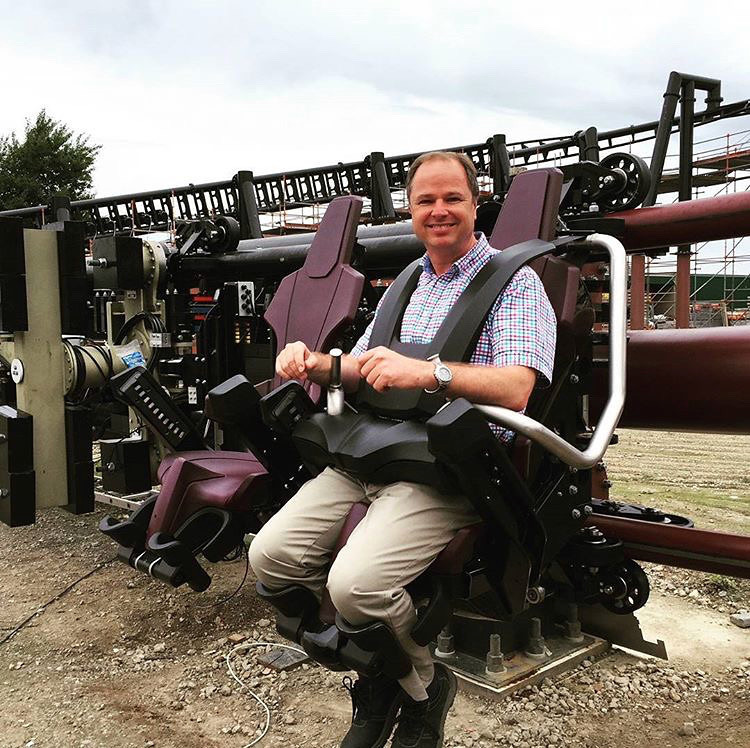
Korrekt. Der Bügel kann weiter geschlossen werden, ist aber limitiert da am Beckenstück, also dort wo die beiden Handstücke auch befestigt sind, zwei große Stahlbolzen jeweils rechts und links in die Schiene einrasten müssen. Dadurch wird der Bügel im kompletten auch als geschlossen markiert oder nicht. Beide (!) Bolzen müssen komplett in die Rasten der jeweiligen Schienen eingerastet sein und einen Kontakt herstellen, ansonsten bekommt der RideOP keine Freigabe und der Zug kann nicht auf seine Reise geschickt werden. Der Bügel wird dabei nicht von einem Öldrucksystem oder ähnliches unten gehalten (kann man recht gut erkennen wenn man den Bügel mal bevor er in der ersten Raste einrastet loslässt, er geht komplett auf und wird nicht zurückgehalten). Woher ich das weiß? Bei meiner letzten Fahrt mit FLY im Wintertraum und durch dickere Kleidung welche man trägt musste nachgedrückt werden damit der Bügel in die erste Raste einrastet. Bevor der Zug abgefertigt wurde kam eine Durchsage per Funkgerät das bei meinem Bügel etwas nicht stimmt, dabei wurde dann noch einmal kurz gedrückt und man hat gespürt und gehört wie der Bolzen in die Raste eingerastet ist. Die "Straps" an den Schultern sind dabei übrigens weiterhin flexibel und können auch bei eingerasteten Bügel noch bewegt werden weil diese während der Fahrt durch die unterschiedlichen Fahrbewegungen unterschiedlich belastet werden und dadurch beweglich bleiben müssen. In dem geschilderten Fall denke ich das die Tochter entweder recht klein und/oder schlank war und die Eltern wahrscheinlich Angst hatten (und dabei dem Sicherungssystem nicht komplett vertraut haben) das die Tochter da irgendwie rausschlüpfen kann. Ein Fehler vom System schließe ich hier ehrlich gesagt aus, ich denke eher das hier auf Vorsicht gehandelt wurde da die Eltern eben kein gutes Gefühl hatten. Im angehängten Bild sieht man auch die Rasten auf den jeweiligen Schienen rechts und links.
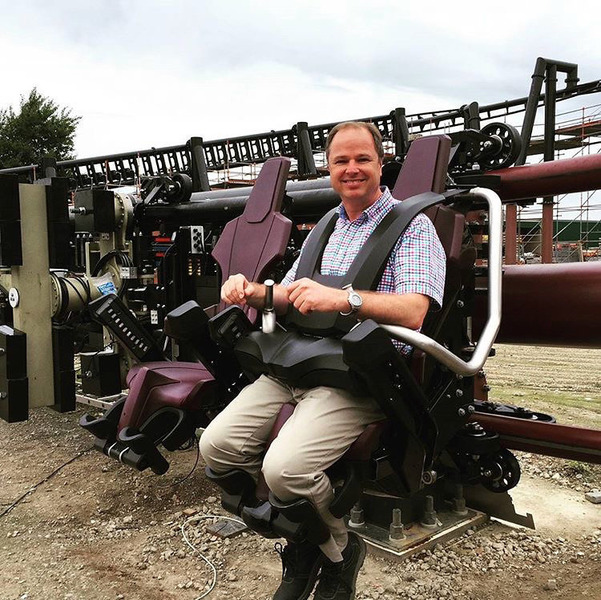
-
Die Antwort kam dann heute. Die Buchung von Kabinen für Einzelpersonen ist nun wieder möglich. Ein Grund oder ähnliches wurde nicht genannt. Na immerhin geht es wieder :) Ich bin ebenfalls die beiden Tage vor dem Wintertraum da und nehme den ersten Wintertraumtag dann auch direkt mit.
-
Die ersten Sonderangebote für Hotelaufenthalte 2026 wurden heute freigeschaltet, das Phantasialand versendet eifrig Mails derzeit. Ggf ist es derzeit nur ein Fehler, aber es ist derzeit nicht möglich als Einzelperson eine Kabine im Charles Lindbergh zu buchen. Alle Termine sind ausgebucht. Setzt man die Personenzahl auf 2 sind die Kabinen wieder buchbar. Das wäre extrem schade wenn das PL sich nun entscheidet die Kabinen nicht mehr für Einzelpersonen buchbar zu machen. Ich frage mal per E-Mail nach, auf die Antwort bin ich gespannt.
-
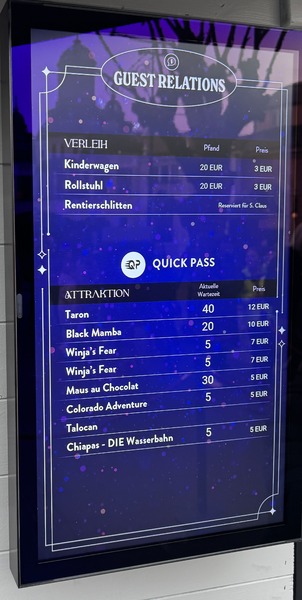
Jep genau so ist es :) Du musst extra zum Gästeservice. @flaffstar schau dir am Wochenende im Wintertraum mal gegen Abend die Quickpass Schlange bei Taron an, die stehen teilweise bis raus zur Brücke außerhalb des Wartebereichs. Die verkaufen die wie warme Semmeln.
-
Es wirkt ehrlich gesagt wie ein Test, es gibt ja auch keine genauen Infos auf der Homepage, sondern man verweist einfach auf den Gästeservice vor Ort. Wahrscheinlich tastet man sich ran und schaut ab wann das Gemeckere zu viel wird... da von den Quickpässen aber an Tagen wie heute dennoch viel zu viele gekauft werden, wird man sich wohl dran gewöhnen müssen.
-
Das stimmt, dies konnte ich auch schon mehrmals sehen. Ich denke, gerade wenn ein großer Besucheransturm erwartet wird (Wintertraum/Sommerferien), werden auch Aufträge außerhalb vergeben damit man quasi dem Andrang Herr der Lage wird. Ist aber auch nur so ein Gedanke.
-
Die sind nach wie vor ganz normal gültig und müssen nicht umgetauscht werden. Die neuen Quickpässe mit QR Code sind übrigens wie die alten nur am gleichen Tag gültig. Daher gibt es hier auch keine Verkaufsmöglichkeit auf Kleinanzeigen oder Ähnliches. Ich gehe aber ehrlich gesagt davon aus das spätestens zur nächsten Saison auch die Kulanz Quickpässe geändert werden, das Phantasialand hat die Ausgabe dieser Kulanz Quickpässe mittlerweile sowieso stark reguliert.
-
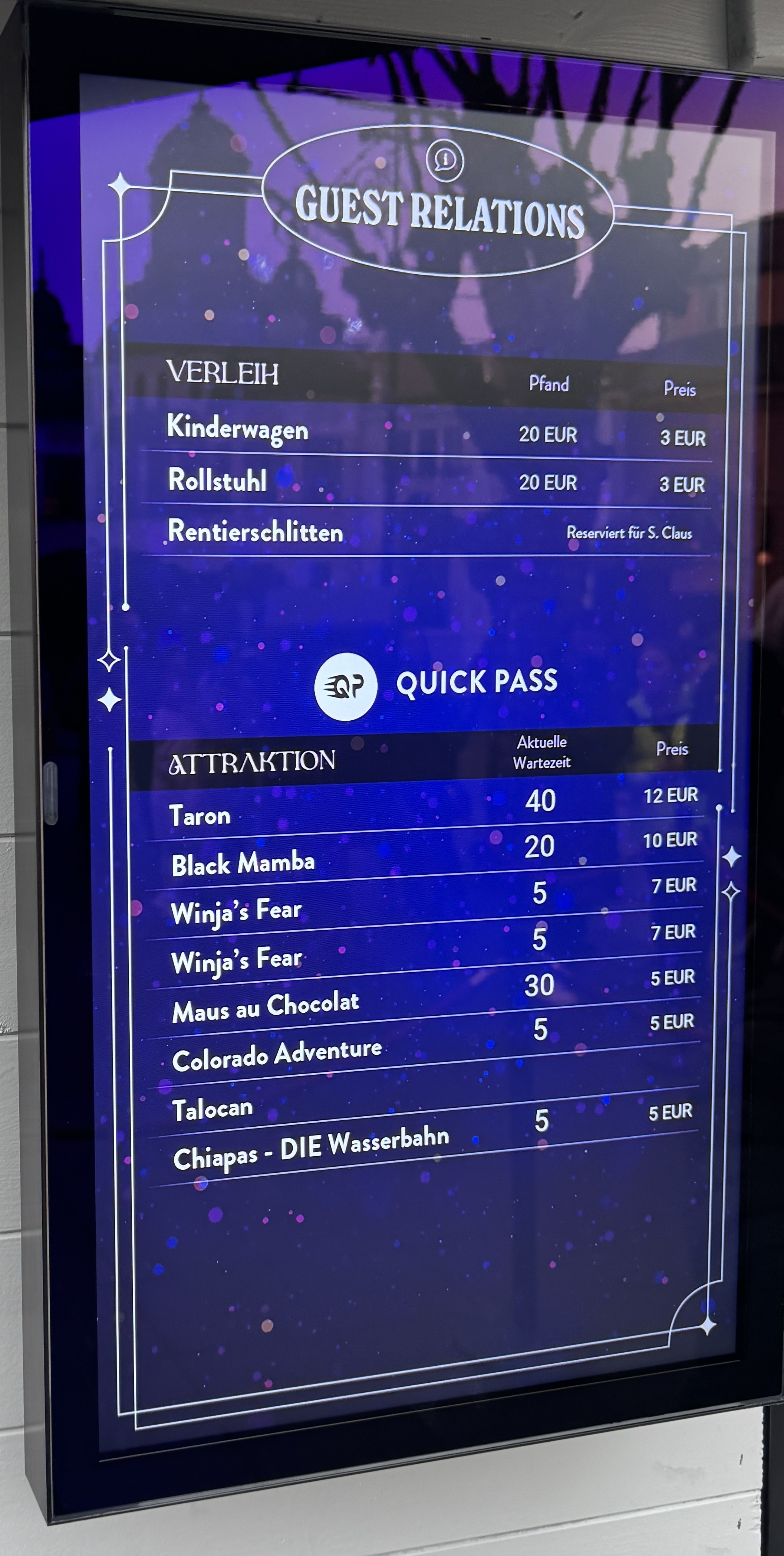
Die Quickpässe werden nun auch nicht mehr nur „angerissen“ tatsächlich ist auf jedem Quickpass nun ein QR-Code der auch geprüft bzw gescannt wird. 12 Euro ist allerdings eine Ansage. Schauen wir mal was da ggf. noch so kommt.
-
Seit heute gibt es neue Quickpässe bzw. Änderungen dazu. Quickpass und Quickpass Plus gibt es als solche nicht mehr. Stattdessen zahlt man nun pro Fahrt für einen Quickpass.
-
Gestern waren auch 80 Minuten angezeigt, die Schlange bei Taron für die erste Schlange war aber komplett leer, hat den Mitarbeiter auch gewundert und so hat er alle mit Quickpässen in die Reihe 1 geschickt... Zitat: Na wenn die alle nicht wollen dann dürft ihr halt
-
Ich habe hier eher das Gefühl das man hier versucht die Besucherströme zu steuern, wenn man mehrere Tage im Park ist und das ganze einfach mal beobachtet sieht man das recht gut. Gerade die Warteschlangen von F.L.Y. und Taron nehmen ja auch seeeehr viele Personen auf. Erst standen 80 Minuten bei Taron, die Warteschlange im Tal war komplett gefüllt ohne Abkürzungen und die letzte Person stand quasi am Ende des Gebäudes wo man am Anfang durchgeht. 10 Minuten später stand dann auf einmal 50 Minuten. Am Ende stand man dort aber mind. 100 Minuten. Alles nur Vermutungen und besonders geschwankt hat es als die Gastronomie ziemlich voll im Allgemeinen war.
-
Bei den Ausfall/Kulanz-QuickPässen gab es auch eine Änderung. Der Quickpass ohne Taron ist so wie er die letzten Jahre war in Blau, der Quickpass welcher auch für die Black Mamba und Taron gilt hat eine andere Farbe erhalten und hat nun einen lila Farbton erhalten. Wahrscheinlich damit man diese besser auseinanderhalten kann.
-
Chiapas ist seit Samstag Mittag übrigens nicht mehr in Betrieb. Sie fuhr etwa 2 Stunden lang und ist dann geschlossen worden. Auch das Wasser wurde wieder abgepumpt. Am Sonntag war die Situation so den ganzen Tag ohne das sich irgendwie was getan hat. Mal schauen wann sie wieder in Betrieb geht.
- 2.271 Antworten
-
-

-

- 6
-
-
- Wasserbahn
- Intamin
- Chiapas
- Mexico
-
Mit dem Tag versehen:
-
Dem muss ich zustimmen, gerade am letzten Tag war es extrem. Man war wirklich genervt. Ich unterstütze daher ebenfalls diese Entscheidung. Kleine Info noch am Rande: Auch bei den Hotelbuchungen gibt es eine Neuerung in dieser Saison, die Zimmer müssen mittlerweile innerhalb von 10 Tagen nach Buchung bezahlt werden und nicht wie bisher 21 Tage vor dem Aufenthalt.
-
Ich habe eher Sorge das es sich hier um Danny handelt, könnte auch vom Alter her passen