




-
Wintertraum 26/27
Na hoffentlich hast du es damit nicht heraufbeschworen...
-
-
-
-
-
-
Neu 202X: Angepasste Berlin Thematisierung
Die Bude wird vollgehauen. Dementsprechend sieht auch die Nachfrage nach Quickpässen aus.
-
-
Bananenflanke hat auf Ein Beitrag in einem Thema reagiert:
Neu 202X: Angepasste Berlin Thematisierung
-
-
Neu 202X: Angepasste Berlin Thematisierung
Und wo gibt es dann den Quick Pass für die Quick Pass Stand Schlange?
-
-
-
Die Sache mit der Erweiterung...
Korrekt. Der Movie Park bekommt es z.B. aber auch nicht hin seinen eigenen overflow Parkplatz ordentlich zu beleuchten oder zu "entmatschen". ;)
- Neu 20XX: Spekulationen/Wünsche
-
TOTNHFan hat auf Ein Beitrag in einem Thema reagiert:
Verbleib von Animatronics aus Burg Falkenstein
-
-
[Mystery] Mystery Castle
- 914 Antworten
-
- Windhoven
- Erschrecker
- dunkel
- Free Fall Tower
-
Mit dem Tag versehen:
- Massenausschreitung in Walibi Holland
- Die Sache mit der Erweiterung...
Das der Park überhaupt eine Person speziell zur "Unternehmenskommunikation" hat wäre mir schon neu. Der ist wohl tatsächlich noch nicht lange dabei. 😝- Neu 20XX: Spekulationen/Wünsche
- Massenausschreitung in Walibi Holland
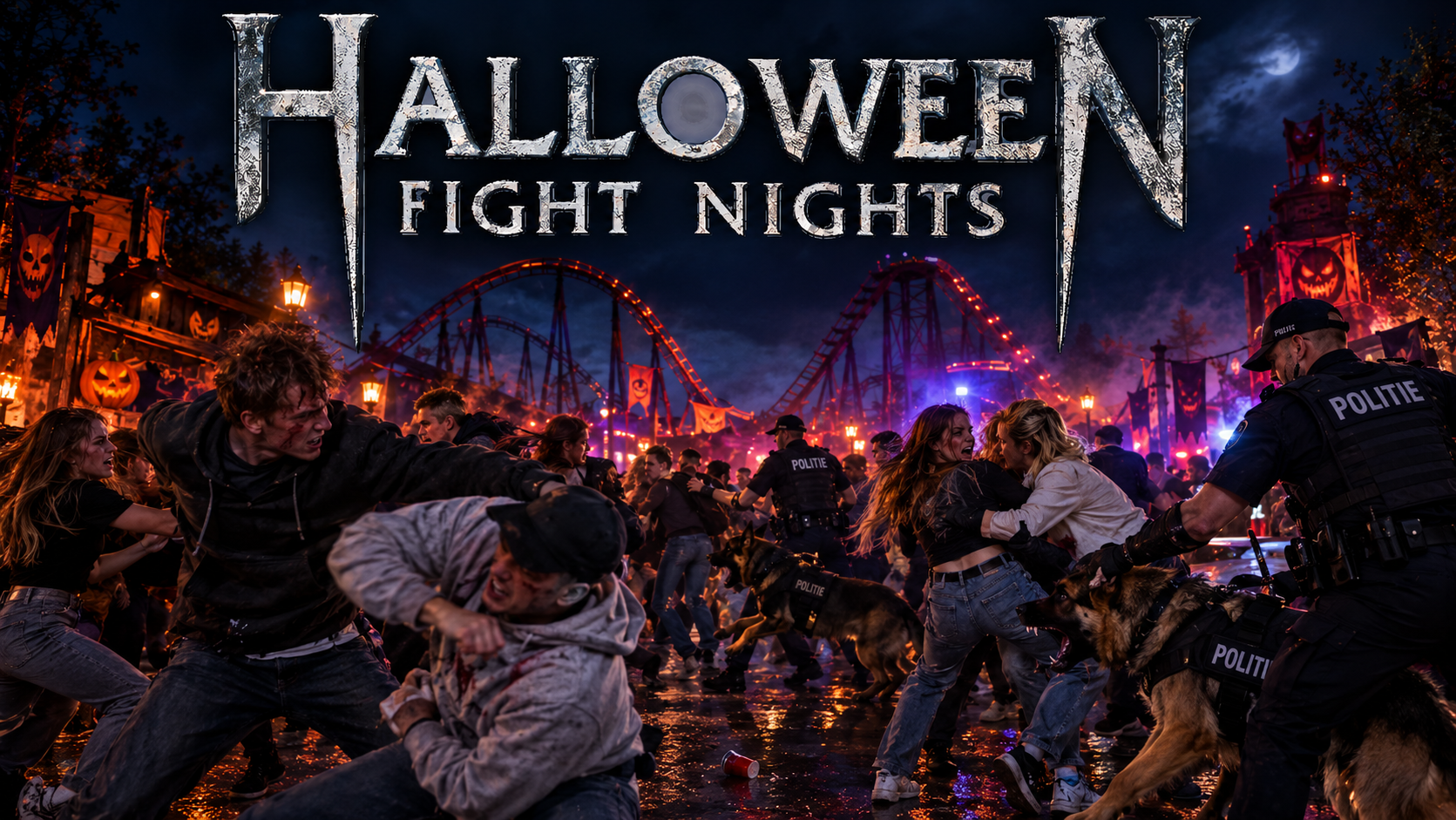
Während der Halloween Fright Nights kam es zu einer Massenschlägerei mit mehreren Verletzten, Plünderungen etc. in Walibi Holland. Die niederländische Polizei rückte mit Hundestaffel an. Warum wundert mich das bei dem Park und dessen Publikum nur nicht?... 🙄 Er war Mal auf einem so guten Weg von diesem Image wegzukommen mit der Music Battle Geschichte. Nur um diese dann nach 2 Stellinger Millionen Investition schlussendlich doch wieder in den Sand zu setzen.- [Mexico] Talocan
Mystery Castle Eingangsschild, das auf und ab hüpft Crazy Bats Schild was nur mit VR Brille sichtbar ist und ansonsten eine schwarze Wand ist.- [Mexico] Talocan
- Was hörst du gerade?
- Neu 20XX: Spekulationen/Wünsche
Konto
Suchen
Configure browser push notifications
Chrome (Android)
- Tap the lock icon next to the address bar.
- Tap Permissions → Notifications.
- Adjust your preference.
Chrome (Desktop)
- Click the padlock icon in the address bar.
- Select Site settings.
- Find Notifications and adjust your preference.
Safari (iOS 16.4+)
- Ensure the site is installed via Add to Home Screen.
- Open Settings App → Notifications.
- Find your app name and adjust your preference.
Safari (macOS)
- Go to Safari → Preferences.
- Click the Websites tab.
- Select Notifications in the sidebar.
- Find this website and adjust your preference.
Edge (Android)
- Tap the lock icon next to the address bar.
- Tap Permissions.
- Find Notifications and adjust your preference.
Edge (Desktop)
- Click the padlock icon in the address bar.
- Click Permissions for this site.
- Find Notifications and adjust your preference.
Firefox (Android)
- Go to Settings → Site permissions.
- Tap Notifications.
- Find this site in the list and adjust your preference.
Firefox (Desktop)
- Open Firefox Settings.
- Search for Notifications.
- Find this site in the list and adjust your preference.